
As a content creator in 2026, ensuring your AI-generated videos meet quality standards is crucial for engaging your audience. Yet, you might find that even sophisticated AI tools sometimes produce videos that lack clarity or have other quality issues. This guide will walk you through common problems and how to fix them, helping you maintain a professional standard in your video content.
AI technology, like that offered by Vexub, promises seamless video creation, but understanding the nuances of troubleshooting can elevate your content. From blurry visuals to audio sync issues, this article provides a comprehensive approach to resolving these challenges, ensuring your videos are as impactful as possible.
Understanding Common AI Video Quality Issues
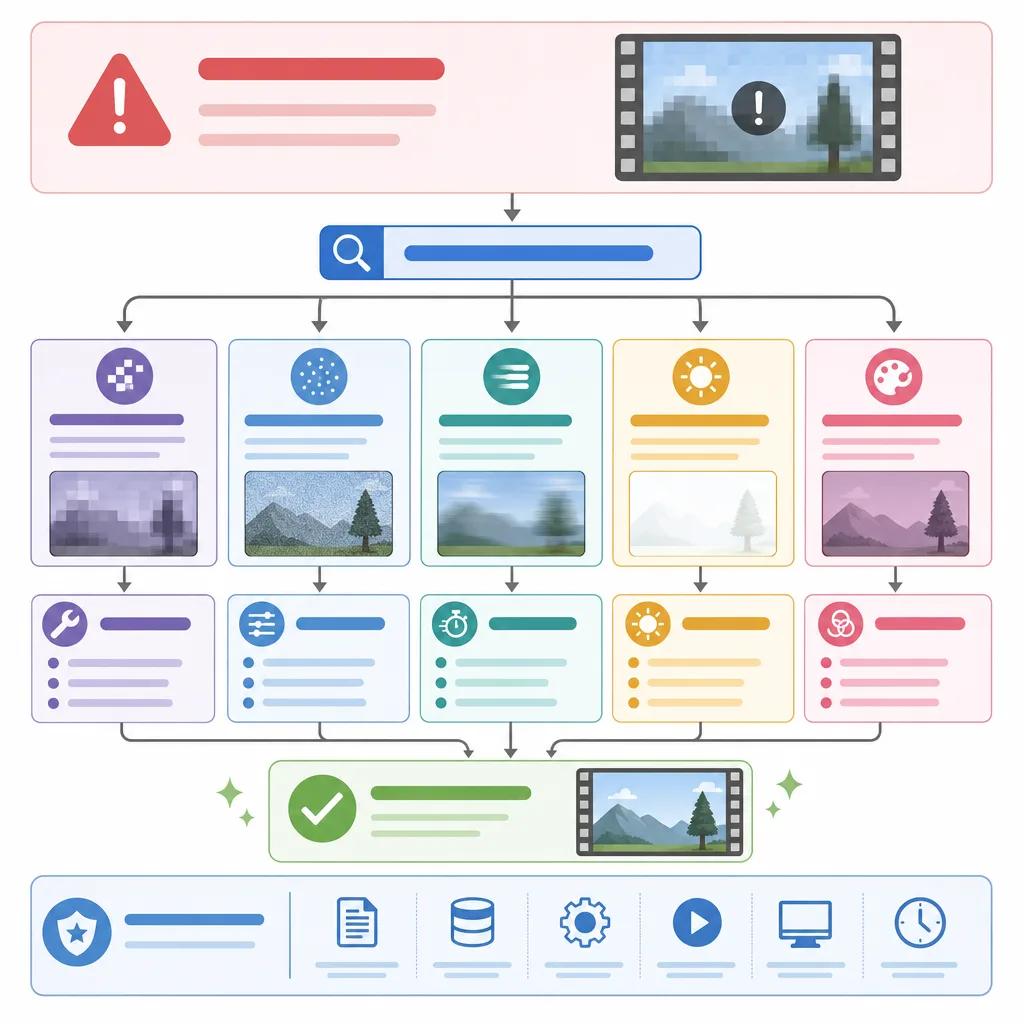
Before diving into solutions, it's important to identify the common quality issues you might face. Blurry images, poor audio synchronization, flickering, and color inaccuracies are frequent complaints. Each of these problems has distinct causes and solutions.
Blurriness often occurs when the resolution settings are too low or when AI misinterprets certain visual data. Meanwhile, audio sync issues can result from frame rate mismatches. Flickering may be due to inconsistent lighting or frame processing errors. Understanding these root causes is the first step in troubleshooting.
Steps to Fix Blurry AI Videos
Blurry videos can frustrate viewers and detract from your message. To address this issue, first ensure your source material is high quality. AI processes images and videos based on the input it receives; better inputs yield better outputs.
Check the resolution settings within your AI video tool. Adjusting these settings to at least 1080p can often eliminate blurriness in the final output. Additionally, using a tool like Vexub, which offers advanced resolution settings, can be beneficial.
If the problem persists, consider enhancing your video's sharpness through post-production software. This can be a quick fix to improve clarity without compromising on the video length or content.
Resolving Audio Sync Problems
Audio sync issues can disrupt the flow of your video and confuse viewers. These problems usually stem from discrepancies in frame rates between video and audio tracks. To fix this, ensure that both are recorded or set to the same frame rate before video generation.
Vexub provides tools to adjust these settings, allowing you to maintain consistent audio-visual synchronization. Sometimes, adjusting the audio track's start time in a video editing program can resolve minor sync issues.
For persistent sync problems, it might be beneficial to check for updates in your AI tool, as manufacturers regularly release patches to address such technical issues.
Advanced Audio Sync Solutions
In cases where standard solutions don't work, consider using external audio editing software. Programs like Audacity can be used to slightly stretch or compress audio tracks, aligning them perfectly with the video.
Additionally, experimenting with different formats can sometimes resolve these issues. For example, exporting audio in uncompressed formats may maintain better sync during the AI processing stage.
Create videos like this with AI
Script, voiceover, images and subtitles — automated in minutes.
Eliminating Flicker and Color Issues
Flickering and color inconsistencies can detract from the professional appearance of your videos. Flicker usually results from inconsistent lighting during recording or the AI's frame processing.
To eliminate flickering, ensure consistent lighting conditions during video recording. Using tools like Vexub can also help as they often include features to stabilize lighting and reduce flicker.
Color inaccuracies can often be corrected through color grading in post-production. Adjusting the hue, saturation, and brightness can improve the visual appeal of your video, creating a more vibrant and accurate color palette.
Utilizing AI Features for Optimal Quality
Maximizing the features of AI video creation platforms can significantly enhance the quality of your content. Vexub, for example, offers dynamic rendering options and customizable settings that allow you to fine-tune each element of your video.
Experimenting with different AI settings can lead to discovering new configurations that best suit your content type. Whether you're creating videos for link('parenting tips', '/blog/ai-video-tools-parenting-tips') or link('real estate marketing', '/blog/ai-real-estate-video-marketing'), adapting these tools to your needs is essential.
Additionally, regularly updating your AI software ensures you receive the latest improvements and bug fixes, keeping your tools performing optimally.

Ensuring High Quality in AI Video Outputs
Achieving high-quality AI video outputs requires a blend of the right tools, settings, and techniques. Regularly reviewing and adjusting your workflow can help maintain consistency and quality.
Using platforms like Vexub, which are tailored for ease of use and flexibility, provides a competitive edge. These platforms offer customizable options that allow for precise adjustments tailored to specific content types, whether it's link('dynamic podcasts', '/blog/dynamic-podcasts-ai-videos') or link('viral TikTok videos', '/blog/make-viral-tiktok-videos-ai').
In conclusion, while AI video creation can initially present challenges, understanding and implementing effective troubleshooting techniques empowers you to produce professional-grade videos that captivate and engage your audience.







